
When someone pastes your profile link into Discord, X or another app, it shows a preview card. With Premium you choose the title, description, image and favicon that appear there.
Open Premium › Metadata or go to zyo.lol/metadata.
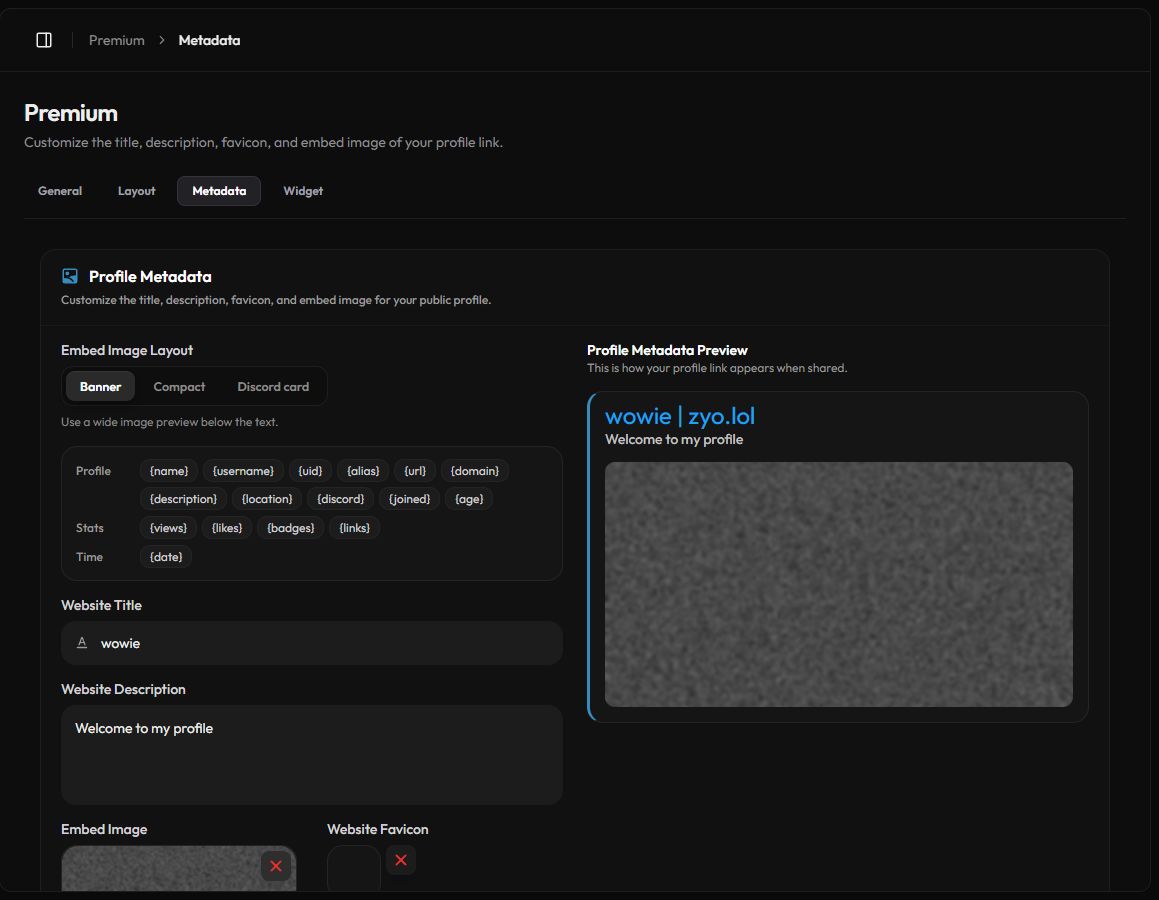
What you can change
| Field | What it does | If left empty |
|---|---|---|
| Website Title | The bold title of the preview. | zyo.lol is added after it. | Your display name. |
| Website Description | The text under the title. | Your profile description. |
| Embed Image Layout | Banner shows a wide image under the text. Compact shows a small thumbnail on the right, like a Discord card. | Banner. |
| Embed Image | The image in the preview. | Your background image, or an auto-generated zyo.lol card if your background is a video. |
| Website Favicon | The small icon in the browser tab when someone opens your profile. | The zyo.lol icon. |
Edit your metadata
- Write a title and description. Fill in Website Title and Website Description. Keep them short so apps don't cut them off.
- Pick an image layout. Choose Banner or Compact under Embed Image Layout.
- Upload an embed image. Click the Embed Image box and pick a file.
- Upload a favicon. Click the Website Favicon box and pick a file.
- Save. Press Save Changes in the bar at the bottom.
To remove an uploaded image, press the × on it and confirm.
File rules
| File | Formats | Max size | Notes |
|---|---|---|---|
| Embed Image | PNG, JPG, JPEG, GIF | 10 MB | Wide images work best for Banner. |
| Favicon | PNG, JPG, JPEG, WEBP, ICO | 5 MB | At least 32×32. Larger images are resized to 32×32. |
Still seeing the old preview?
Apps like Discord save a copy of a link preview the first time they see it. A new title or image can take a while to show up in places where your link was already posted. Pasting the link in a new message usually shows the latest version once their copy expires.
Tip
Your Image Host files have their own embed designer. See Discord embeds.