
Fake Info changes the view and like counts shown on your public profile. You can add a number on top of your real counts, or replace them with a fixed number. It's part of Unleash.
Open Unleash › FakeInfo or go to zyo.lol/fakeinfo.
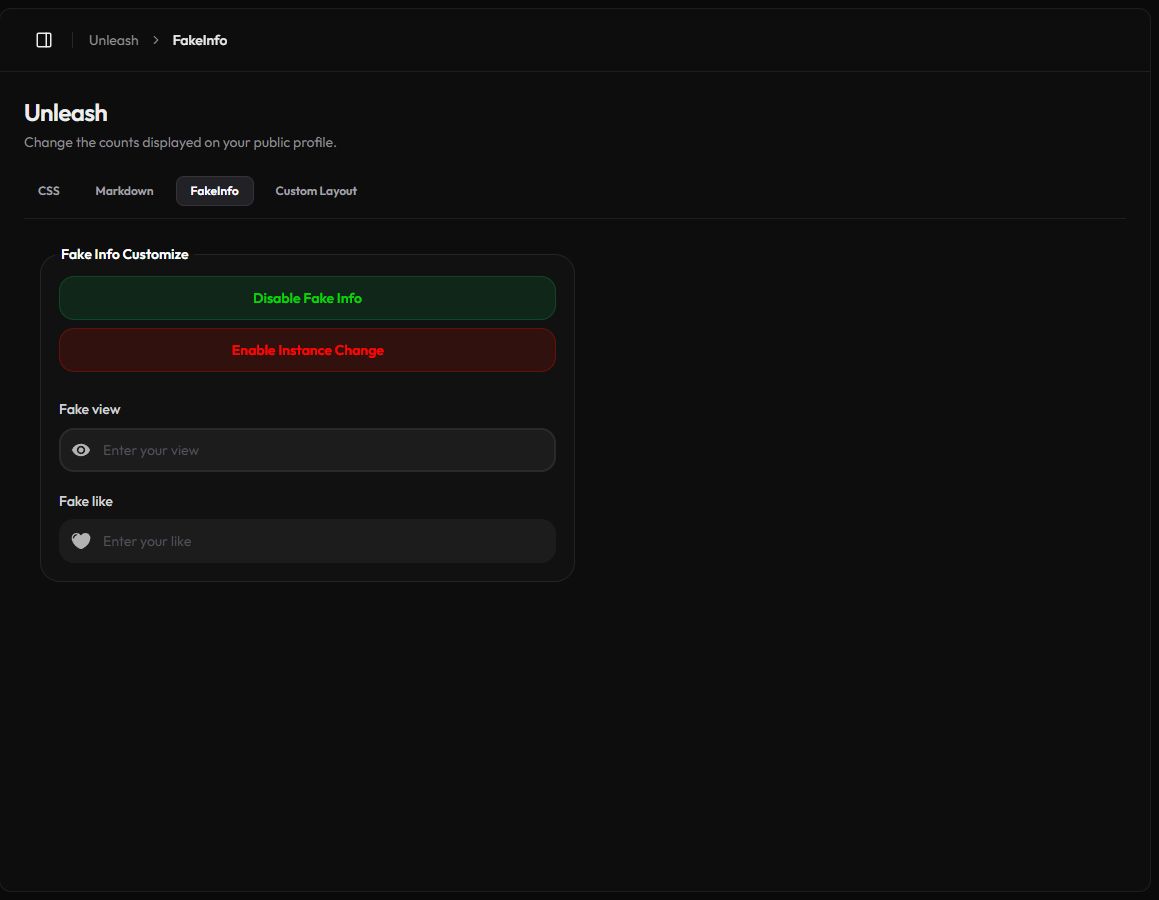
Two ways it works
| Instance Change | What visitors see | Example with 1,200 real views and Fake view 5000 |
|---|---|---|
| Off | Your real count plus your number. It keeps growing with new views. | 6,200 |
| On | Exactly your number. New views don't change it. | 5,000 |
The same rules apply to the like count.
Set it up
- Turn it on. Make sure the first button says Disable Fake Info. If it says Enable Fake Info, press it.
- Pick a mode. Press Enable Instance Change to show a fixed number, or leave it off to add to your real counts.
- Enter your numbers. Fill in Fake view and Fake like. Leave a field empty to keep the real count.
- Save. Press Save Changes in the bar at the bottom.
Number rules
Use digits only, with no commas or spaces, and up to 15 characters. Otherwise you'll see Please enter a valid number for view. or Please enter view under 15 characters.
What it affects
- Only the numbers shown on your public profile change. They're shown with commas, like
6,200. - Your real views and likes keep counting in the background.
- Your dashboard and analytics still show the real numbers.
Hide the counter instead
Would you rather not show a view count at all? Turn on Hide View on the Premium General page.
Turn it off
Press Disable Fake Info. Your profile shows the real counts again, and your numbers stay saved for next time.