
A Custom Layout replaces the built-in layouts with your own HTML. You place blocks like your name, links and music with simple tags, wrap them in your own markup, and zyo.lol fills them in from your saved data. It's part of Unleash.
Open Unleash › Custom Layout or go to zyo.lol/customlayout.
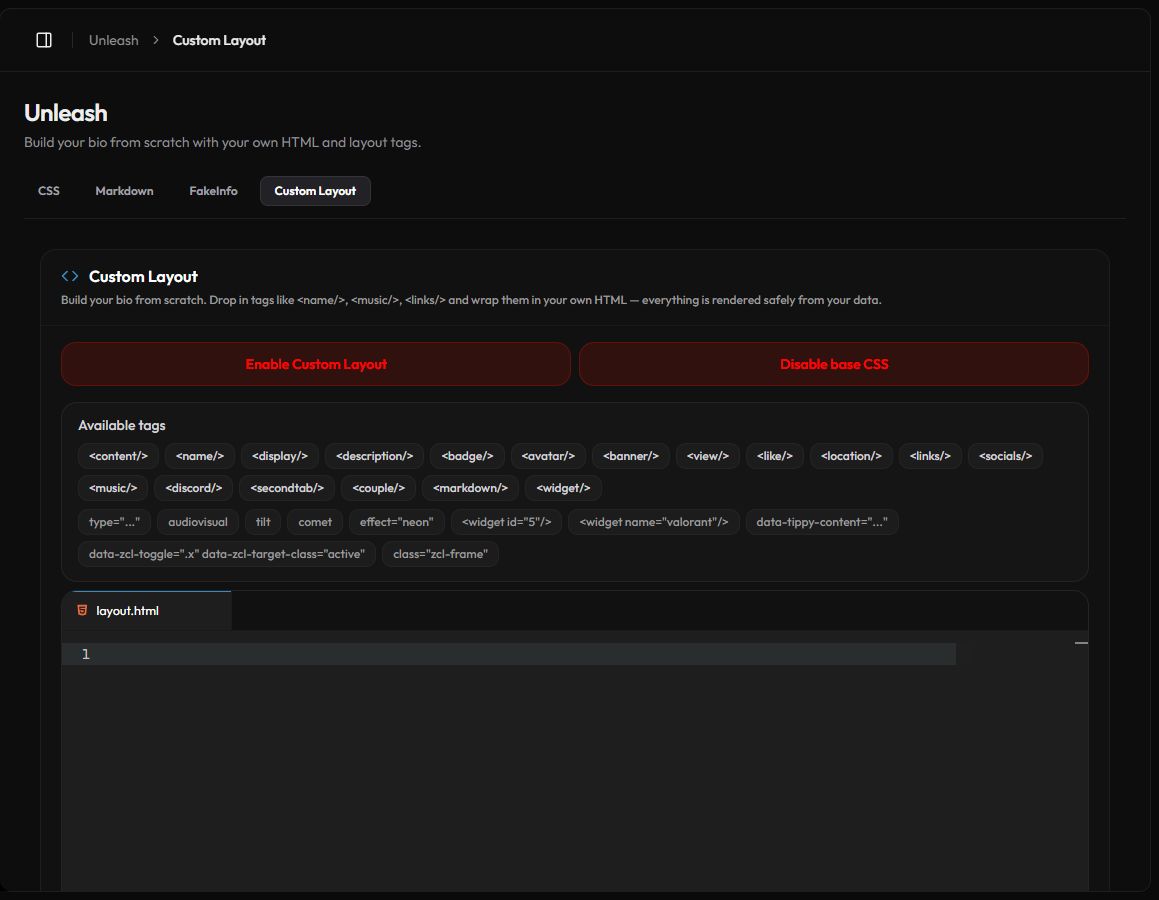
Get started
- Write your layout. Type HTML and tags in the layout.html editor. Start small, like the example below.
- Save. Press Save Changes in the bar at the bottom. Tags and attributes that aren't allowed are stripped from the saved copy, so reload the page to see exactly what was kept.
- Turn it on. Press Enable Custom Layout. Your profile now uses your layout instead of Layout 1–6.
- Style it. Add styles on the Custom CSS page or with
styleattributes.
<content>
    <banner/>
    <avatar/>
    <name effect="neon"/>
    <description/>
    <socials/>
    <links type="small"/>
</content>
<music/>
<discord/>
<widget/>Press Disable Custom Layout to go back to your normal layout. Your code stays saved.
Layout tags
Each tag is replaced by a block of your profile. A tag only shows something if that feature is turned on and has data. If a block is empty, set it up in its own panel first.
| Tag | Shows | Set it up in |
|---|---|---|
<content> | A card wrapper for other tags. | — |
<avatar/> <banner/> | Your avatar and banner. | Customize |
<name/> <display/> <description/> <location/> | Display name, username, description and location. | Customize |
<view/> <like/> | The view counter and like button. | Customize |
<badge/> | Your badges. | Badge |
<socials/> <links/> | Social icons and link cards. | Customize, Links |
<music/> | The music player. | Customize › Audio |
<discord/> | Your Discord presence. | Customize |
<secondtab/> | Your Second Tab. | Premium › Layout |
<couple/> | Your couple card. | Couple |
<markdown/> | Your Markdown section. | Markdown |
<widget/> | Your widgets. | Widget |
If you use a tag whose feature isn't on yet, the layout still saves but you get a warning. Only you see a small note in that spot on your profile; visitors see nothing.
Attributes
type
Picks a variant of a block. Unknown values fall back to the default.
<like type="icon"/>          <!-- button | text | icon -->
<view type="badge"/>         <!-- text | badge -->
<location type="icon"/>      <!-- text | icon -->
<links type="big"/>          <!-- small | big -->
<badge type="premium"/>      <!-- one badge, like premium or verify -->
<music type="lyrics"/>       <!-- image | slider | control-panel | volume-control | name | lyrics -->
<discord type="activity"/>   <!-- avatar | name | badge | guildtag | metadescription | activity -->
<couple type="message"/>     <!-- banner | message | partner-avatar | avatar -->
effect
Animates text on <name/>, <display/>, <description/> and your own <p> and <a> elements. Values: 1, 3, 4, 5, neon, wave, scramble, scramble2.
tilt and comet
Add tilt to a block or <content> for a 3D hover effect. comet adds a moving shine on top.
Pick widgets
<widget/> shows all your widgets. Use <widget id="5"/> for one widget, or <widget name="valorant"/> for every widget of that type.
Click toggle
Add data-zcl-toggle with a CSS selector to any element. Clicking it toggles a class on the matching elements: data-zcl-target-class, or active if you leave it out.
<span data-zcl-toggle=".panel" data-zcl-target-class="open">Menu</span>
<div class="panel"><links/></div>
Tooltips and reveal
data-tippy-content="..."shows a plain-text tooltip on hover, up to 200 characters.audiovisualadds therevealclass to a block. With music on, it stays hidden until the visitor enters, thenactiveis added. You write the reveal CSS yourself.<discord/>,<secondtab/>and<widget/>use.zyo-skeleton-*placeholders while they load, which you can style.
What HTML is allowed
- Common layout and text tags such as
div,span,p,section,h1–h6,ul,a,img,blockquoteandpre, plus inlinesvg. - Attributes:
class,id,style,href,src,alt,title,targetandrel, plus the zyo.lol attributes above. - Removed on save:
script,style,iframe,form,input,button,audio,video, event handlers likeonclick, and unsafe links.
<style> blocks are removed when the layout is saved, even though some examples in the panel guide show them. Put your CSS on the Custom CSS page instead.
Disable base CSS
By default your layout loads zyo.lol's base styles for the built-in blocks. Press Disable base CSS to load no stylesheet at all, only your background and music. Then you have to style everything yourself in Custom CSS. Press Enable base CSS to bring the base styles back.